
Jump to:
Does MDM eavesdrop or record conversations you have from your work phone? It’s understandable to have such concerns. When you know that the company manages your phone or tablet, it’s easy to think that it also controls its microphone.
In this article, we look at the facts. We will clarify what MDM is and whether it has the ability to record or eavesdrop on conversations. We will also guide you on how to check if and when a company-managed smartphone’s microphone is recording audio.
What is MDM and what is it used for?
MDM (Mobile Device Management) is a system that enables companies to remotely and securely manage mobile devices provided for work. While it may sound technical, MDM actually simplifies daily tasks for both the IT department and employees. Here’s an example:
Imagine starting a new job and getting a company phone – straight out of the box. Nevertheless, you don’t have to configure anything. Work apps, mail, contacts and the files you need appear on the device automatically: all you have to do is log into your company account. This is the convenience MDM provides.
If you lose your phone, MDM tool can help locate it. If recovery isn’t possible, the system can remotely lock the device and erase its data to protect against unauthorized access. Additionally, MDM can prevent the installation of applications that may contain viruses or other threats. All these measures aim to secure the company’s resources, not to invade users’ privacy.

Does MDM eavesdrop?
No, because MDM operates through application programming interfaces (APIs) provided by mobile operating system manufacturers. These APIs dictate what an app can and cannot do on a device.
Apple and Google, creators of iOS and Android, have implemented mechanisms in their systems that prevent apps, including MDM, from using the microphone without user knowledge. These restrictions are enforced even when a device is fully managed by IT. No reputable MDM vendor can bypass these protections, as such an app would not be permitted on legitimate platforms (app stores), which enforce compliance with these rules.
Good to know
If an MDM vendor does not offer its mobile applications (MDM agent and additional applications) in an official store, it raises questions about whether choosing that specific system is wise. Credible vendors operate transparently, making their solutions available for verification to ensure security and compliance. To better protect corporate data, it’s advisable to rely on verified software and certified vendors.
Conversely, an MDM system can restrict microphone usage – completely, in specific apps, or in selected locations. Such security policies are commonly employed by law firms, banks, or public institutions that need to minimize the risk of inadvertently recording confidential conversations.
What if a company wants to record audio on a device?
In that case, it must install a dedicated app – not an MDM solution – and obtain the employee’s explicit, informed consent. Additionally, most countries require a legitimate purpose for recording and compliance with local regulations, such as GDPR and the Labor Code.
Can MDM grant apps access to the microphone?
Some applications, like instant messaging or voice recorders, need access to the microphone. However, both Android and iOS systems do not allow apps to use the microphone without your knowledge. By default, when you launch an app for the first time, you will see a message asking for permission to access the microphone. You can choose to accept or reject this request.
If an app, such as a workout app, asks for microphone access, consider whether it genuinely needs it. When in doubt, you can refuse access. If an important function stops working, the app will prompt you again for permissions, allowing you to make a more informed decision.
For MDM-managed devices, the situation is more complex:
- Android: the administrator can grant apps access to the microphone on your behalf, but only within the areas of the device managed by MDM. This does not mean that the microphone will operate covertly, as the device will display an appropriate activity indicator (see the graphic below).
- iOS: on Apple devices, privacy protection is more stringent. Even in full control mode, the administrator cannot grant microphone access to any application; this must always be done by the user.
How can you tell if your phone is currently eavesdropping on you?
Simply granting an app access to the microphone does not allow it to use it secretly. Both iOS and Android clearly indicate when the microphone is active.
On iOS (from version 14), an orange dot appears at the top of the screen. On Android (from version 12 onward), a green indicator is displayed, and users can also completely disable the microphone with a single click.
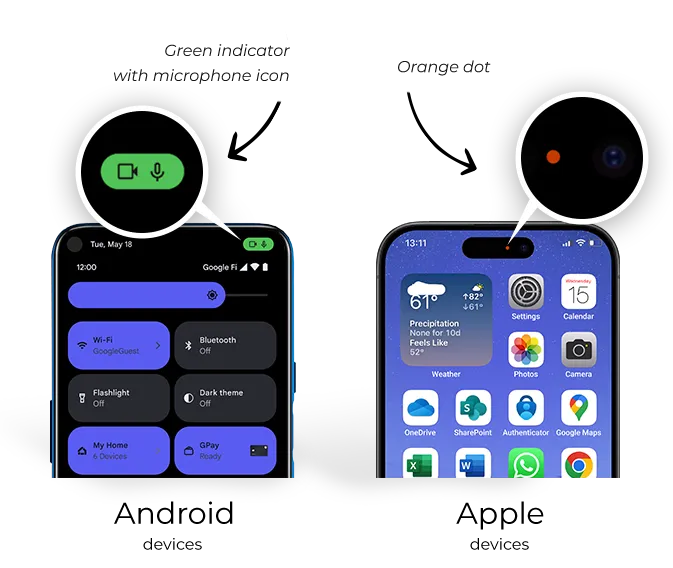
If you notice that your microphone is activated but you’re not making a call or video call, you can easily check which app is using this feature. Simply go to your device’s privacy settings and review the list of apps that have permission to access the microphone. It’s likely that the app utilizing the microphone has already been granted access – either by you or the company.
Summary
MDM is a tool designed to securely manage your company’s devices. It allows for remote configuration, application installation, data security, and response measures if devices are lost. It is not intended for eavesdropping or recording calls – seriously! 😊
Both Android and iOS have built-in mechanisms to protect users’ privacy, even on devices controlled by a company. Granting apps permission to use the microphone requires your explicit consent, and any microphone activity is indicated by indicators visible on the screen.
If you’re worried that MDM is eavesdropping on you through a company smartphone, you can relax. Not even a particularly zealous employer can alter this setup. The system is not designed to record sound; rather, it is intended to streamline processes and safeguard company data, not to track employees.
Our MDM agent is on Google Play…

Author: Agnieszka Pierlak
Marketing specialist with experience in the IT industry. Interested in issues related to cybersecurity and internal security. Privately, a lover of good literature, Asian cuisine and mountain hiking.