
Jump to:
Geofencing is more than just a tech curiosity. It has a remarkably wide range of applications across industries and IT tools. In this article, you’ll learn what geofencing is, how it works, and why integrating it with the right system can tackle a whole host of business challenges.
What is geofencing?
Geofencing is a technology that creates invisible boundaries – so-called geozones – that act like an invisible fence. There’s nothing magical about it… at least not until we assign some “sheep” to that virtual enclosure – in practice, mobile devices. To do that, we need a system or application that uses geofencing, allows us to connect selected devices, and apply specific rules to them within the defined geozone.
How does geofencing work?
Virtual zones are defined using geographic coordinates (latitude and longitude) and a radius covering the selected area. A system using this technology continuously tracks the location of mobile devices connected to it, primarily through GPS. Where GPS is unavailable or unstable, the tool falls back on cellular networks, and when operating indoors, it can additionally use Wi-Fi signals.
When an assigned smartphone or tablet crosses the virtual fence, a set of predefined actions is triggered – right on cue.
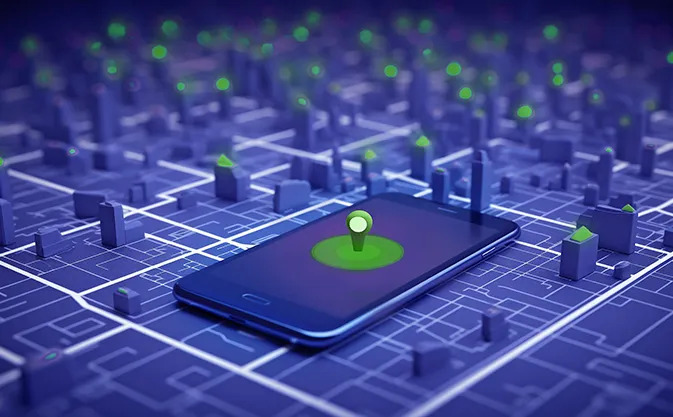
Depending on the system using geofencing, these actions may vary. Here are a few simple examples:
- displaying specific information on the device – for instance, in an art gallery or exhibition, next to a particular display,
- sending an alert to the system administrator when a device leaves a designated zone – for example in parental-control apps or fleet-tracking systems,
- turning a device on or off – for example a security camera.
Where is geofencing used?
The technology is used across many fields: from local marketing, logistics, and transportation to security, event management, and equipment tracking. It enables movement monitoring, user-behavior analytics, and the automation of location-based processes.
Many free apps make use of geofencing, though their features are usually basic – they’re suitable for simple tasks such as parental control or checking whether a device is within a certain area. More advanced options are found in paid solutions, where geofencing supports a specific business purpose as part of a broader toolset.
Geofencing as an integral part of an MDM solution
Geofencing can also operate as a built-in feature of an MDM system, automating mobile-device management based on device location. In Proget system, geofencing extends the core capabilities related to device tracking.
How geofencing works in MDM
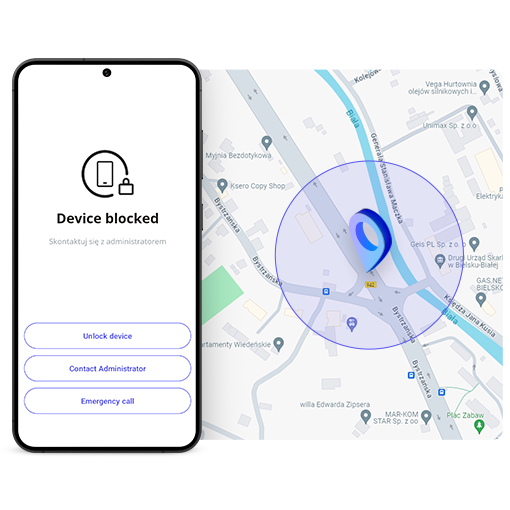
An IT administrator can freely define geozones and the rules assigned to them (policies and profiles), which trigger specific actions on devices connected to the console. Once a virtual zone is created, geofencing in Proget MDM can automatically trigger a range of actions, including:
- user notifications – sent to a device when it crosses a geozone boundary,
- applying additional rules – e.g. a more restrictive security policy, a time-based location profile (5 minutes) or movement-based profile, or a Kiosk mode with apps selected by the administrator
- device protection – automatic device lockdown, disabling its use, or even wiping corporate data or performing a full device wipe.
How geofencing in MDM system supports business operations
Mobile device management is not just about installing apps or updating operating systems. Proget MDM with geofencing allows flexible permission management and dynamic access control to data (depending on deployment scenario).
Use cases
Transportation and logistics
A company employs drivers who use work tablets for navigation, delivery confirmation, and communication with headquarters.
Geofencing function: adjusts the list of visible apps based on the work environment – within defined operational zones (e.g. warehouse premises).
How it works:
- Leaving the warehouse zone – MDM applies a Location profile with apps blocked while in motion feature. Apps unnecessary on the road are hidden when the vehicle exceeds a certain speed. Only navigation tools and HQ communication apps remain available.
- Entering the warehouse zone – the Location profile is automatically removed.
Effect: optimized fieldwork, reduced unauthorized device use while driving, and improved driver safety.
Service industry
A company rents tablets and smartphones for conferences and trade-show booths, or provides rugged devices as ticket scanners at events.
Geofencing function: the MDM system defines acceptable-use zones for each device (e.g. conference center, stadium grounds).
How it works:
- Inside the zone – the dedicated app works normally, or the device retains full functionality.
- Outside the zone (e.g. someone attempts to remove the equipment) – the device locks automatically; remote data wipe can also be triggered.
Effect: protection of equipment and corporate data against loss or theft.
Production industry
Production facilities often store confidential projects, prototypes, and technological data. The company wants to prevent photography, audio recording, or data copying within the production hall or design office.
Geofencing function: creates a “restricted-access zone” covering the production facility, where more restrictive device-usage rules are automatically enforced.
How it works:
- Inside the facility – MDM blocks selected device features such as the camera, microphone, and Bluetooth data transfer.
- Outside the facility – restrictions are lifted, restoring full device functionality.
Effect: effective protection of confidential data and production processes while maintaining device usability outside restricted zones.
Summary
When combined with an MDM system, geofencing becomes a powerful tool for flexible mobile device management, supporting access to corporate resources exactly where it makes sense. The functionality proves useful across numerous industries – from streamlining logistics to protecting industrial data or securing rented equipment.
Define every boundary
with Proget.

Author: Magdalena Martens
Marketing manager with many years of experience, specializing in B2B communications in IT. Involved in the cyber security and Mobile Device Management (MDM) solutions topics for several years. Privately a fan of automotive and Kaizen philosophy.