
Jump to:
- Enterprise Mobility Management – what’s the point?
- Key EMM components, or a little about the system’s functionalities
- Benefits of implementing Enterprise Mobility Management for your company
- 4 ways to manage mobile devices in your company
- What does the implementation of an Enterprise Mobility Management system look like, and what should you consider when purchasing one?
- Summary
- FAQ about EMM system
TL;DR: EMM is an IT system that manages ‘everything’ on mobile devices at work. If all goes well, you set it up once and watch the magic happen while sipping your coffee.
Once primarily used for making calls and sending text messages, today’s smartphones function as personal command centers. They serve multiple purposes, including a calendar, camera, banking application, navigation system, and virtual assistant, all in one device. Furthermore, they are becoming increasingly essential for work. In a corporate setting, smartphones act as mobile offices, granting access to email, documents, and various systems. But how can you effectively manage all these functions when every device is part of the business ecosystem? Read the article below to learn more about what EMM is and how it benefits companies.
Enterprise Mobility Management – what’s the point?
Companies are increasingly faced with the challenge of managing a growing number of mobile devices that must also be secured. This includes both business and personal devices used for everyday tasks at work.
For some organizations, the main challenges in managing mobile devices involve listing individual device users, providing up-to-date contact information for the phone book, installing a few popular applications, and setting passwords. Many of these tasks can be accomplished without specialized IT tools. A good old spreadsheet and manual device configuration before handing it over can suffice. As long as there are no changes needed during use, companies can avoid concerns about changing users or disposing of the devices.
But the reality is that ensuring continuous data availability, maintaining a high level of security, and complying with GDPR regulations complicate the ideal arrangements mentioned earlier. As a result, companies must implement ‘something’ that allow for constant, consistent, and remote control over everything that is work-related, confidential, and not necessarily protected automatically.

This is where Enterprise Mobility Management (EMM) solution comes in, acting like a ‘knight in shining armor’ for managing tasks that cannot be handled manually or that do not make sense to do so. EMM is often seen as a ‘salvation’ for IT departments. Administrators are coming up with new ideas to circumvent the lack of tools and are trying, each in their own way, to manage mobility in the company: from configuring and securing phones, through controlling applications and data, to monitoring compliance with organizational policy – sometimes without even knowing exactly ‘what’s the point.’
What is Enterprise Mobility Management?
Simply put, EMM is a set of rules that enable a company to manage what is stored and what happens on all devices used by employees. Therefore, it is not only control that is important, but also the certainty that the right applications are installed on the equipment, that data is secure, and that everything works as it should.
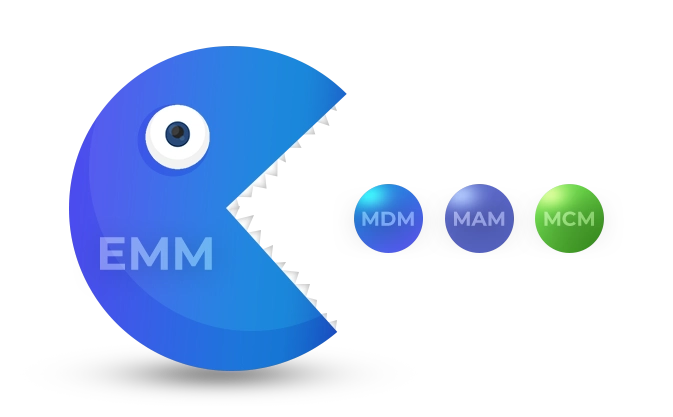
Mobility management combines functionalities from the areas of mobile device management (MDM), mobile application management (MAM), and mobile content management (MCM). It also often includes capabilities related to VPN, remote screen control, location, and MTD (Mobile Threat Defense).
It can therefore be said that the EMM system encompasses not only the administration of a fleet of end devices (smartphones, tablets, laptops, rugged devices) used in offices, production halls, or logistics, but also control over the application environment and access to company data, as well as secure content distribution, so that every employee can work without disruption.
Did you know that systems with MDM in their name often include features typical of EMM or even UEM? Therefore, it is always worth checking carefully what functionalities and management options a specific tool offers.
What tasks does the Enterprise Mobility Management system perform?
The EMM solution is designed to provide consistent security for an organization’s resources that are processed and stored on mobile devices. In practical terms, this means that every phone or tablet, irrespective of its location, user (whether it’s a CEO, manager, or office employee), and the purpose for which it is used, must adhere to the same operating policies.
It’s also important to highlight the significance of centralized system administration. When a company secures a large number of diverse devices with different operating systems – such as Android, Windows, or Apple (iOS, iPadOS, macOS) – without EMM, the IT department has to manage each device separately on its own platform.
EMM allows for remote management, meaning that changes and configurations can be made on a device without needing physical access to it. While preparing equipment for transfer may not pose many problems, adjusting settings or adding secure applications after the device has been transferred – without remote access – can become a significant challenge and be time-consuming for both the IT employee and the user.
Imagine that an administrator in London can manage a phone in Paris that is supposed to reach an employee in Vienna. Similarly, they can take over the device’s screen and help an employee who, while unloading in Madrid, cannot open a file with the certificates needed to complete the order.
EMM implementation supports compliance with personal data protection laws. It can also facilitate compliance with industry regulations and formal requirements related to obtaining and maintaining ISO 27001 Information Security certification.

Key EMM components, or a little about the system’s functionalities
Effective enterprise mobility management requires a comprehensive approach in which every layer of the mobile infrastructure, from hardware to applications to data, is controlled and secured. That is why EMM systems consist of three complementary elements:
Mobile Device Management (MDM)
MDM is the cornerstone of every EMM system. It enables IT departments to control devices, whether they are company-owned or personal (as part of the BYOD model). MDM facilitates various tasks, including: remote configuration of devices and network settings (Wi-Fi, VPN), device monitoring and equipment inventory, remote wiping and locking of devices, and finally encryption and enforcement of passwords with a specific complexity.
In the Proget console, administrator can create detailed configuration profiles that can be assigned to specific departments, locations, or user roles within the company. Management occurs in real time, ensuring that changes are implemented efficiently and that continuous compliance with organizational policies is maintained.
Mobile Application Management (MAM)
MAM enables the control of the entire lifecycle of applications, not just those from official stores or enterprise tools, but also dedicated programs sourced from .apk files and external resources. With MAM, administrators can distribute applications freely and determine which ones users are allowed to install and which ones they cannot. This capability is essential for enforcing company policies and helps IT staff better evaluate the quality of publicly available applications.
EMM administrators will have the tools necessary to enforce the permissions requested by applications. Many apps seek access to various resources, including tracking capabilities, even though this may not be necessary for their proper functioning. Additionally, a key feature of MAM is the ability to perform regular and remote applications updates, considering their versions and scheduling the updates appropriately.
Mobile Content Management (MCM)
MCM is a component designed to manage company documents and files accessed on mobile devices. Its primary purpose is to ensure secure and policy-compliant access to data – no matter where employees are located or what type of device they are using. Mobile management includes features such as file encryption, user permissions, temporary access to documents, and the automatic deletion after their expiration date.
Benefits of implementing Enterprise Mobility Management for your company
EMM provides several business benefits, including cost reduction, enhanced security, a rapid response to needs and incidents, and the implementation of device functions that would otherwise be impossible without EMM.
Process optimization and automation
Modern EMM enable the automation of processes related to the manual configuration of each device, which is particularly burdensome in large organizations and environments with a high degree of IT infrastructure complexity. For instance, EMM allows for the remote and collective installation of applications on multiple devices, as well as updates, permission changes, and the scheduling of system updates during off-hours, such as evenings when devices are not in use. By simplifying these tedious processes, EMM significantly reduces the time required for manual configuration and allows the IT department to reallocate its resources to other important projects.
The Proget solution further enhances efficiency by offering automatic device registration and configuration (auto-enrollment). This feature allows a device to download the configuration prepared for it by the administrator, along with the assigned policies, applications, and network settings, making it ready for immediate use. Notably, this entire process can be executed remotely, eliminating the need for physical interaction between IT staff and the device. Necessary changes can also be implemented at any time after the equipment has been distributed.
Data protection and security incident response
A core component of the EMM system is comprehensive protection of company data. EMM facilitates multiple layers of security, including the enforcement of password usage, complete application control, permission limitations, and the capability to lock or wipe devices in the event of loss.
Additionally, built-in features for detecting abnormal device behavior (MTP profile) aid in identifying threats and preventing data leaks. Automatic responses to attempts to bypass security measures, combined with detailed reporting, provide administrators with effective tools to prevent security incidents.
Remote management and supporting users
Remote management is one of the key advantages of EMM systems. This feature allows administrators to perform actions on devices connected to the management console without needing physical access to them. It operates similarly to a remote control for a home device connected to an app on your phone, but it provides a wider range of configuration options. That’s why the console is typically divided into multiple tabs and often requires desktop setup.
Similarly to management, technical support for users experiencing device issues can also be provided entirely remotely. With EMM, the administrator can, with the user’s consent, take control of the device’s screen. This allows them to quickly access the appropriate settings, diagnose the problem, or gather the information required to resolve the issue.

What you can’t do without EMM
In short, EMM simply allows administrators to do more. First, EMM enables centralized management of all operating systems, such as Android, iOS, iPadOS, and Windows, from a single location, which without this solution would have to be done separately on each platform. Second, it offers much broader management capabilities than the functions available to users from the device settings.
Here are a few simple comparisons:
Application management
- Without EMM, you can manually install applications from Google Play or the App Store on each device individually.
- With EMM, you can do this from one place, collectively, and quickly on any number of devices simultaneously. In addition, you can also manage app permissions, remotely block them, and install files from various sources – not just official stores.
Security policy
- Without EMM, you can manually set password enforcement, fingerprint use, and device encryption on the device.
- With EMM, you can enforce these policies globally on all devices in your organization. You can also apply them when a device does not meet security requirements (e.g., no encryption, password too simple), for example by blocking it.
Blocking access to device features
- Without EMM, you can manually restrict access to features such as mobile data or the camera through the app settings on an individual device.
- With EMM, you can centrally disable these features on all devices within your organization, regardless of whether they are used by employees.
Managing an employee’s phone
- Without EMM, you can agree with an employee to configure company email on their device. In return, they must set up a password for access and commit to remotely deleting all contents if the device is lost.
- With EMM, you can agree with the employee to create a work profile on their device, where you can upload company data or applications and secure it with a password. If the device is lost, you can remotely wipe the profile.
4 ways to manage mobile devices in your company
Due to their compact size, mobile devices often offer more features than traditional computers used primarily at desks. Depending on your company’s needs, mobile devices can be deployed in various ways.
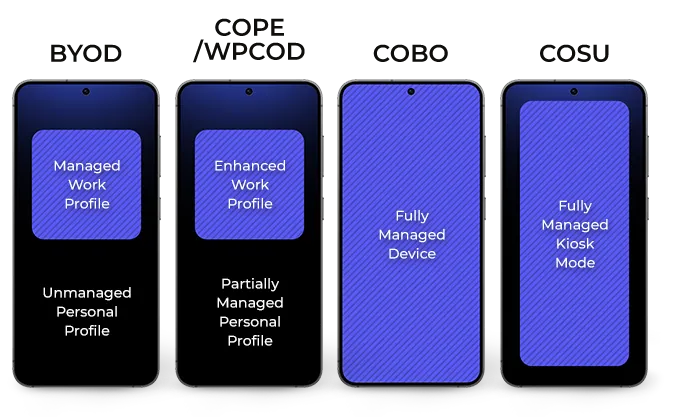
Note: Implementing any of these methods requires an EMM system. The ability to run a device in a specific mode and the model names themselves are closely linked to the device’s operating system. For example, in Android, we refer to ‘Profile Owner’ or ‘Device Owner’, considering issues of device ownership (private vs. company). In Apple’s systems (iOS, iPadOS), we discuss ‘unsupervised’ and ‘supervised’ modes, as well as ‘personalized’ and ‘non-personalized’ devices, which also depend on ownership type. For the purpose of this article, we will use model acronyms related to Android and explain how they function.
Employee phones for business purposes (BYOD)
The term BYOD, which stands for ‘Bring Your Own Device’, refers to a company’s consent to allow employees to use their personal smartphones, tablets, or laptops for work. This model offers significant flexibility and reduces hardware costs, making it an appealing option for many organizations. Of course, ‘permission’ alone does not require an organization to use an EMM system, but without it, the company has no control over what happens to its data on an employee’s device.
By implementing EMM on personal devices, a company can create a managed work profile that separates work data and applications from personal ones on the employee’s device. This enables the organization to establish specific security rules for its resources and, in case of an emergency, to remotely erase information contained in the work profile. It is important to note that users can delete this profile at any time, which is why BYOD is not generally recommended as the primary model for device implementation. Nevertheless, it is the only model that offers any degree of security for private devices.
Company phones enabled for personal use (COPE)
COPE, which stands for ‘Corporate Owned, Personally Enabled’, also known as WPCOD (Work Profile on Company Owned Devices) is a model that allows an employee to use a company-owned device for personal purposes as well. In this scenario, the organization manages the device and allocates both work and personal spaces on it. The company maintains control over policies and device settings, while employees have a private, protected profile that is invisible to the organization, allowing them to store personal data freely.
This model strikes a balance between company control and employee convenience. It also allows for the safe implementation of a policy that treats the device as a benefit for the employee, hence its popularity in corporations and public administration. Implementing COPE with an EMM system offers the company more extensive options for managing and securing its data than with BYOD. However, it still does not provide complete security capabilities.
Company devices for work use only (COBO)
COBO (Corporate Owned, Business Only) is a model in which company devices are utilized exclusively for professional purposes, granting the organization complete control over the equipment. This approach is especially popular in sectors such as uniformed services, logistics, healthcare, and any field where the security and reliability of equipment are top priorities.
The EMM system implemented on devices under the COBO model allows for comprehensive management and restricts non-work-related functions, such as installing games or watching movies. In addition to various data and application security features, it enhances support for users by ensuring a smooth workflow for their daily tasks. In our opinion, COBO is the best choice for any organization.
Company-owned equipment for a specific task (COSU)
The COSU (Corporate Owned, Single Use) model, often referred to as Kiosk Mode, represents an advanced version of COBO. This model allows a company’s device to be restricted to performing a single task. Devices deployed in this model can be customized to function as payment terminals, self-service ordering kiosks, barcode scanners for product information, time clocks, or information points, all thanks to EMM.
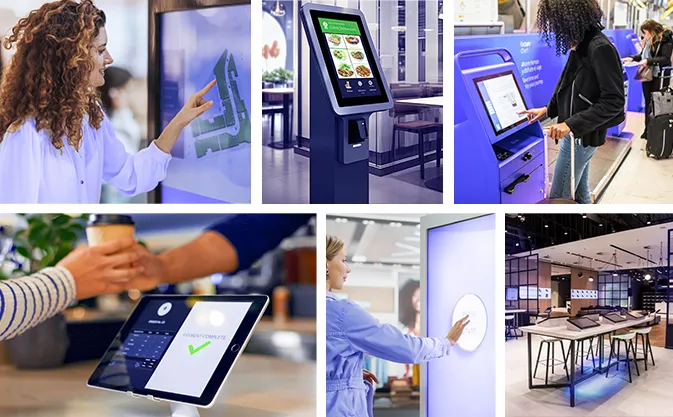
Configuring devices for COSU involves hiding unnecessary applications, locking the device settings, and launching the designated application (or set of applications) in Kiosk Mode. Remote monitoring of the device’s technical condition, along with automatic updates, helps ensure operational continuity, reduces the need for physical intervention, and significantly lowers maintenance costs.
COSU is commonly utilized in various industries such as retail, public transport, manufacturing and other sectors, where the ability to tailor a device to a specific purpose is crucial.
What does the implementation of an Enterprise Mobility Management system look like, and what should you consider when purchasing one?
The EMM implementation process should be carefully planned and tailored to meet the specific needs of your company. Key factors to consider include the types of operating systems in use, the device deployment model, and the required level of security. It’s essential to focus not only on technical configuration but also on adapting security policies and providing training for system administrators on the tool’s capabilities.
The implementation of Proget software is supported by comprehensive technical and organizational assistance, which begins during the testing phase. As part of the pre-sales consultation, remote sessions with an engineer are available to analyze your organization’s needs and select the appropriate implementation model. Additionally, migration support is offered – this includes assistance with local installations to ensure a smooth and secure transition from existing solutions. All activities are customized to fit the specifics of your IT environment and your company’s security policies.
Win this battle with Proget.

Deploying devices to EMM and configuring them
Each device that a company wants to manage must be added to the EMM system administration console. Depending on the chosen deployment model, this may require restoring the device to its factory settings. Therefore, it is advisable to plan the purchase of the EMM system before acquiring a large batch of new devices.
The Proget system, through its integration with Android Zero-Touch, Apple Business Manager, and Samsung KME, simplifies the process of deploying devices to the EMM console. Once devices are added to the system, it allows for automatic and collective configuration, helping to ensure that phones and tablets are ready for work more quickly and efficiently.
Licensing and system updates
When considering the purchase of an EMM solution, companies should assess their current needs, the condition of their mobile resources, and their plans for expanding their device fleet. It is important to choose a license that includes all necessary functionalities and is implementable in the suitable version: cloud and/or on-premise.
Regular updates of both the EMM system and the agent (the application installed on devices connected to the console) are essential for ensuring uninterrupted compatibility, regulatory compliance, and access to new features. Therefore, it is advisable to check how frequently the vendor releases updates for their software.
Integration with mobile operating systems
For effective enterprise mobility management, full compatibility with popular operating systems is crucial. Consequently, choosing an EMM that supports not only Android devices but also Apple devices (including iOS, iPadOS, and macOS) as well as Windows is essential. Proget meets these requirements by enabling central administration of various operating systems, which makes it easier to implement EMM in environments with a diverse range of devices.

Summary
The Enterprise Mobility Management (EMM) system is the foundation of a modern organizational strategy for conscious management of mobile devices in a company. This IT solution integrates components such as MDM, MAM, and MCM to enable full automation of processes related to hardware configuration, application installation, and data access control – both on company devices and private devices used for work.
The key advantage of EMM is cost reduction through IT process optimization and increased information security thanks to effective policies enforced regardless of the employee’s location or the type of hardware and software used, including Apple, Android, and Windows devices. Remote and centralized management configuration allows organizations to consistently control their mobile fleet, reduce the risk of data leaks and human error, and adapt to changing legal regulations.
This solution works throughout the entire lifecycle of devices – from unpacking, through user and function changes, to full consumption. Implementing Enterprise Mobility Management is not only a step towards digital transformation, but above all a conscious investment in the security, efficiency, and flexibility of an organization’s operations.
FAQ about EMM system
What are enterprise mobility management (EMM) services?
Enterprise mobility management (EMM) tools and services help organizations manage and secure mobile devices, applications, and data. EMM solutions enable remote work with different operating systems while maintaining consistent security and compliance for both company-owned and personal devices.
How does EMM work?
EMM is a comprehensive solution that typically consists of several related and complementary modules that focus on specific aspects. These elements work together to control and secure an organization’s mobile infrastructure, including phones, tablets, laptops, and ruggedized devices.
What is UEM software?
Unified endpoint management (UEM) is an even broader solution than EMM. It involves controlling all endpoints that have an operating system using a single platform.
Would you prefer to talk?

Author: Magdalena Martens
Marketing manager with many years of experience, specializing in B2B communications in IT. Involved in the cyber security and Mobile Device Management (MDM) solutions topics for several years. Privately a fan of automotive and Kaizen philosophy.