
Jump to:
- What is a mobile device security audit?
- How does a security audit improve protection, and which areas does it examine?
- How to prepare your organisation for the audit, step by step
- The role of MDM systems in device security audits
- The most common errors identified during a security audit
- Summary
- FAQ: mobile device security audit
An increasing number of companies and public institutions rely on extensive fleets of mobile devices, bringing new challenges in cybersecurity and data access management. At the same time, organisations must meet growing requirements for information protection arising from, among others, the GDPR and the NIS2 Directive, as well as standards such as ISO 27001.
In these circumstances, a mobile device security audit is one of the key elements in assessing an organisation’s IT security maturity. Proper preparation for it not only helps demonstrate compliance with requirements but also protects company resources more effectively.
What is a mobile device security audit?
A mobile device security audit is a structured process for assessing how smartphones, tablets and laptops used within an organisation are managed. It covers an analysis of device configuration, data processing practices, applicable procedures and the security measures in place.
The purpose of the audit – examining integrity, correctness and compliance
The primary purpose of the audit is to confirm that mobile devices are properly protected and that the organisation operates in line with applicable regulations and its own procedures. The audit is therefore intended both to demonstrate compliance with requirements and to genuinely improve the level of security by identifying weaknesses in the IT environment.
Activities should be based on widely applied regulations and standards, such as ISO 27001, the GDPR and the NIS2 Directive.

How does a security audit improve protection, and which areas does it examine?
A security audit typically covers the following areas:
- access control, authentication mechanisms and encryption – the audit verifies the use of strong passwords, multi-factor authentication (MFA), screen locks and data encryption on devices;
- mobile application and update management – the audit covers how applications are installed, control over their permissions, and how regularly operating systems and software are updated;
- identifying security gaps and optimising costs – fixing irregularities before an incident occurs is usually far cheaper than dealing with the consequences of a data breach or cyberattack.
How to prepare your organisation for the audit, step by step
Proper preparation for a mobile device audit helps streamline the process and reduces the number of non-conformities identified. This process should begin well in advance, allowing enough time to complete documentation and implement the necessary changes.
1. Hardware inventory
The first step is to draw up a complete list of the mobile devices used within the organisation. The register should include, among other things, the device type, operating system version, assigned user and details of the security measures applied. Particular attention should be paid to equipment that has been decommissioned, lost, or is still assigned to people who have left the organisation.
2. Reviewing and updating security policies and documentation
The existing policies and procedures covering the use of mobile devices (including personal devices under a BYOD model), their management, incident response and staff security training should be reviewed. All documents should be up to date, consistent, and reflect the practices actually followed within the organisation.
3. Verifying system configuration and incident response procedures
The next step is to check whether the configuration of devices and the MDM system (if the organisation uses one) complies with the adopted security policies. This should cover, among other things, the authentication and encryption methods used, how applications are managed and how updates are rolled out. It is also worth making sure that incident reporting and handling procedures are known to staff and are tested regularly, for example through device-loss simulations.
4. Carrying out a pre-audit assessment
Before the formal audit, it is worth carrying out an internal compliance assessment to identify potential irregularities and resolve them before the formal review begins. The results of the pre-audit are best compiled as a list of non-conformities and corrective actions, together with the person responsible and a completion deadline. This helps prioritise issues and reduces the risk of critical problems remaining unresolved until the formal audit.

The role of MDM systems in device security audits
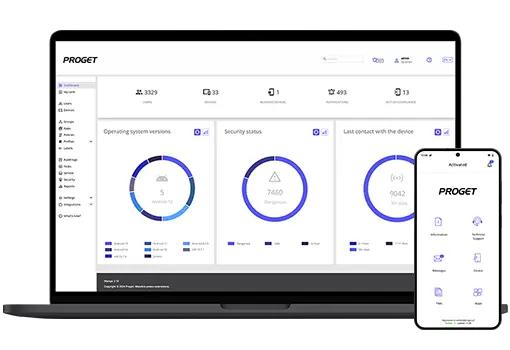
Preparing an organisation for an audit is far easier when mobile devices are under centralised management. MDM (Mobile Device Management) systems allow administrators to continuously monitor the state of devices, enforce security policies and quickly prepare the information required during an inspection.
The most important MDM features that support audit preparation:
- automated compliance reporting – the system can generate reports on device configuration, security levels or compliance with adopted policies, either on a scheduled basis or on demand;
- enforcing encryption and MFA from a single console – administrators can centrally enforce data encryption, multi-factor authentication (MFA) and other security mechanisms across all managed devices;
- event history, audit logs and remote management – the system stores information on configuration changes, administrator actions and device-related events. This makes it easier to demonstrate compliance during an audit and to respond quickly to any issues identified.
Centralised management is particularly important for public institutions. Bodies such as government offices and local authority units may use numerous devices with access to data and systems used to carry out public tasks. MDM makes it possible to apply consistent security rules across these devices and to document their use for inspections and audits.
The most common errors identified during a security audit
Many organisations struggle with similar problems. These often stem not from a lack of tools, but from outdated procedures, insufficient control over devices or organisational errors. The most frequently identified irregularities are:
- unmanaged devices within the corporate environment (shadow IT) – employees use devices that are not under the control of the IT department or covered by applicable security policies. The solution is to enforce device registration in the MDM system and bring them under the appropriate policies.
- lack of up-to-date security policies and training – documentation does not reflect actual processes, or employees are unaware of the rules for using mobile devices safely. To prevent this, procedures should be updated regularly (following changes to legislation, device usage or the introduction of new systems) and staff training should be carried out.
- no data encryption, MFA disabled, and outdated systems – devices run outdated software versions or lack basic protection mechanisms (such as a password), increasing the risk of a successful cyberattack. Corrective action should include enforcing data encryption, implementing multi-factor authentication, and automatic system and application updates, or at least regular reminders to install them.
Summary
A mobile device security audit makes it possible to assess not only the level of technical protection, but also the quality of processes and existing documentation. A well-prepared, consistent security policy and staff who are aware of the risks significantly increase the chances of a positive audit outcome. MDM systems provide valuable support here, making it easier to manage devices, reduce the risk of non-compliance and handle reporting.
Fleet audit?
The key is good preparation.
FAQ: mobile device security audit
What is a mobile device security audit?
It is a structured assessment process that checks whether the mobile devices used within an organisation meet security requirements, applicable legal regulations and internal IT policies.
How to prepare for an IT audit?
The foundation is a thorough inventory of devices, a review of current security policies, verification of the configuration of the deployed MDM system, and the compilation of the appropriate documentation and reports.
What does a security audit most often reveal?
The most common issues include gaps in enforcing encryption, the absence of multi-factor authentication (MFA), the use of unmanaged devices (shadow IT), and outdated operating system versions.
Does MDM help with the audit?
Yes, an MDM system is a huge help, as it allows centralised policy management, the generation of automated compliance reports, and real-time control of the device fleet, providing evidence that the appropriate security measures have been implemented.

Author: Magdalena Martens
Marketing manager with many years of experience, specializing in B2B communications in IT. Involved in the cyber security and Mobile Device Management (MDM) solutions topics for several years. Privately a fan of automotive and Kaizen philosophy.