
Jump to:
Mobile device management has become an essential component of every modern organisation’s IT strategy. However, with accelerating digital transformation, an increasingly mobile workforce and a growing number of cybersecurity incidents, managing devices manually is no longer a practical or scalable approach.
A Mobile Device Management (MDM) system addresses these challenges by providing centralised control over corporate data across both company-owned devices and employees’ personal devices used for work. As a comprehensive endpoint management solution, MDM enhances data security, supports compliance with regulatory requirements such as the GDPR and the NIS2 Directive, while improving operational efficiency and employee productivity.
What is Mobile Device Management (MDM)?
Mobile Device Management is a software solution that enables businesses and organisations to remotely manage, secure and monitor smartphones, tablets, laptops, rugged devices and other portable endpoints used by employees.
Mobile devices have become an integral part of IT infrastructure, supporting office-based, field and remote work alike. As organisations deploy more devices, however, managing their configuration, security and compliance becomes increasingly complex. Every endpoint stores or accesses corporate information, making it a potential security risk. What happens if a device is lost or stolen? Or if an employee inadvertently installs malicious software?
An MDM (Mobile Device Management) system is designed to address these challenges. It provides centralised management of all mobile endpoints, helping organisations strengthen data protection, standardise device management and simplify day-to-day IT operations.
With modern device management capabilities, organisations can:
- automate mobile fleet management processes,
- enforce consistent security policies,
- respond rapidly to security incidents,
- optimise costs throughout the entire device lifecycle.
What role do MDM systems play in organisations?
MDM Mobile Device Management plays a critical role in protecting corporate data and ensuring business continuity. Regardless of their operating model, modern organisations require centralised tools to manage their device estate. This is driven not only by the growing number of technologies in use, but also by the need to enforce consistent security standards across the workforce – regardless of employees’ roles, locations or device types.
MDM software streamlines device enrolment, enables remote and bulk configuration, enforces security policies and provides secure application deployment. Enterprise-grade MDM platforms support all major operating systems, including Android, Apple (iOS, iPadOS, macOS) and Windows. As a result, IT administrators no longer need to manage multiple disconnected tools; instead, they can oversee the entire device fleet through a single, unified MDM environment.
Deploying an MDM solution improves mobile device security and operational efficiency, automates routine IT tasks and enables effective endpoint management regardless of device location. MDM also supports organisations in meeting GDPR requirements. For public sector organisations and highly regulated industries, where compliance with the NIS2 Directive and sector-specific regulations is essential, an MDM platform becomes a fundamental component of a resilient and efficient IT environment.

Why is it worth to implement an MDM system in a company?
Organisations that implement an MDM solution gain complete visibility and control over their mobile device fleet. Beyond centralised management, Mobile Device Management provides tangible benefits in terms of security, regulatory compliance and process automation, while improving operational efficiency and reducing overall IT costs. Below are the key advantages of implementing Proget MDM – an independent Mobile Device Management solution.
Enhanced data security
Modern cyber threats, including phishing attacks, malware and unauthorised access, require organisations to adopt robust security controls. Mobile Device Management delivers multiple layers of protection through capabilities such as device encryption, remote device locking and remote data wiping in the event of loss, theft or other security incidents.
An MDM mobile system provides far more than configuration and access management. It also includes preventative security controls and incident response capabilities, enabling organisations to maintain full control over corporate data while significantly reducing the risk of data breaches, cyberattacks and regulatory non-compliance.
Increased employee productivity and efficiency
A modern device management system improves efficiency for both IT administrators and end users. For IT teams, deploying an MDM solution means centralised administration, automated workflows, remote bulk configuration, controlled software updates and rapid incident response – all without time-consuming manual intervention.
For employees, MDM ensures that devices remain secure, compliant and consistently operational, reducing downtime and supporting uninterrupted business processes. Users also benefit from reliable access to the applications and resources required for their daily work, while IT teams can resolve technical issues more quickly. This is particularly valuable in mobile and remote working environments, logistics, field services and sales, where device reliability has a direct impact on productivity and business performance.
Cost optimisation and reduced business risk
An MDM solution helps reduce the cost of managing an organisation’s mobile device fleet. By automating repetitive tasks such as asset inventory, device configuration and software updates, it allows IT professionals to focus on higher-value strategic activities. Remote support capabilities also minimise the need for on-site servicing, reducing maintenance costs and limiting operational downtime. In addition, MDM enables organisations to monitor and control mobile data usage – for example by restricting or disabling data roaming in selected locations, resulting in measurable cost savings.
Mobile Device Management software also helps organisations avoid the financial and reputational consequences of security incidents. Features such as remote device location, remote locking and secure data wiping protect corporate information if a device is lost or stolen or falls into unauthorised hands. By mitigating these risks, organisations can reduce the likelihood of data breaches, regulatory fines and the loss of customer trust.

Regulatory compliance
Organisations operating within the European Union must comply with an increasing number of regulatory requirements, including the General Data Protection Regulation (GDPR) and the NIS2 Directive. At the same time, ISO/IEC 27001 has become the recognised benchmark for information security management across many sectors. Although an Mobile Device Management system alone does not guarantee regulatory compliance, it provides many of the technical controls required to help organisations meet their compliance obligations.
Proget MDM enables organisations to: deploy and enforce security policies for both users and devices, remotely block access to corporate data on lost device, and control applications. These capabilities are particularly valuable for organisations subject to GDPR, which applies to any organization that processes personal data, and NIS2 applicable to sectors deemed essential or important to the economy and the state.
As the developer of the MDM system, Proget holds both ISO/IEC 27001 and ISO 9001 certifications, demonstrating its commitment to maintaining high standards of information security and service quality. The company is also the only MDM provider to hold a Polish Świadectwo Bezpieczeństwa Przemysłowego certificate, enabling it to work with classified information. This is particularly significant for public sector organisations and businesses operating within strategic industries.
In addition, the solution has undergone penetration testing performed by Securitum, an independent company specialised in IT security auditing.
Support for the secure BYOD policy execution
Bring Your Own Device (BYOD) strategy allows employees to use their personal devices for business purposes. While this approach increases flexibility and enhances the employee experience, it also introduces significant security and management risks.
The MDM system on the phone enables organisations to implement a genuine BYOD strategy without compromising employee privacy. By creating separate workspaces on personal devices, business and personal data remain completely isolated from one another. The organisation manages only the work profile, while the employee retains full control over the personal one. A properly designed MDM solution should never compromise this separation, and employees remain free to remove the work profile from their own devices at any time. This privacy model is enforced by the operating system vendors themselves, and all MDM providers must comply with these platform requirements.
Proget company is a member of the Android Enterprise Partner Program, meaning that Proget MDM is developed in accordance with Google’s latest security standards for Android system. The platform is regularly updated to reflect the guidance from all major mobile operating system vendors, ensuring ongoing compliance with both technological and regulatory requirements.
Proget mobile device manager supports secure BYOD deployments by managing access to corporate information without intruding on users’ personal privacy. Employees can therefore use business applications safely on their own devices while remaining fully compliant with organisational policies and regulations.

Key features of MDM systems
Mobile Device Management systems provide a comprehensive set of tools for managing both corporate-owned and personally owned mobile devices within a single environment. Proget, a proprietary Mobile Device Management solution, supports IT administrators by automating routine processes while strengthening the security of an organisation’s mobile infrastructure. As a flexible and scalable device management platform, it meets the needs of both large enterprises and small and medium-sized businesses.
Remote configuration and mobile device management
Remote configuration (auto-enrolment) has become a standard capability of modern device management systems. It enables IT administrators to register new devices in bulk (zero-touch deployment), automatically assign configuration profiles and security policies, and install required applications – regardless of where the end user is located. Although seemingly a minor improvement, this level of automation fundamentally transforms device provisioning. It significantly reduces deployment time, eliminates manual configuration errors and lowers both operational costs and the workload placed on IT teams.
In practice, this means that an administrator based in London could remotely configure newly purchased smartphones stored in a warehouse in Manchester before they are shipped directly to new employees working in Edinburgh or anywhere else. Once the employee receives the device, they simply power it on, sign in using their corporate credentials, and within minutes the device is fully configured and ready for use – without any physical involvement from the IT department.
Device monitoring and asset inventory
An MDM system provides comprehensive mobile device monitoring capabilities, giving IT administrators access to detailed reports covering hardware specifications, inventory data and compliance with the company’s configuration. This makes mobile device management more informed and efficient – IT can quickly detect anomalies, optimize resources, and respond to potential threats.
MDM also serves as a valuable source of endpoint telemetry. It collects and presents detailed information about the entire fleet: from the device model and operating system version to the installed applications and security status. It also allows devices to be assigned to specific users or groups of users. An accurate device inventory enables effective control over resources and the planning of replacements for ageing equipment.
Remote lock and data wipe
Losing a device, experiencing theft, or the sudden resignation of an employee does not necessarily pose a security risk for the organization. Enterprise-grade MDM solutions allows for the remote deletion of work-related data (known as a ‘selective wipe’) or the complete restoration of the device to its factory settings (factory reset). The administrator can also immediately lock the phone – even without an internet connection – via pre-configured security policies.
Device encryption and password enforcement
One effective way of protecting information on mobile devices is encryption, which ensures that data remains secure even if the device is lost or stolen. An MDM system allows organisations to enforce device encryption in line with their security policies, thereby increasing control over the protection of corporate assets.
MDM also enables the enforcement of complex password policies, including the requirement for PINs, alphanumeric codes of a specified level of complexity, biometric authentication, and regular password changes. Furthermore, within the MDM console, administrators can define password policies tailored to the type of device, operating system (Android, Apple, Windows) or user group. This makes endpoint management more flexible and better suited to the organisation’s specific circumstances.
Remote application distribution and update
Remote application distribution is an important part of streamlining an administrator’s workflow. MDM Proget enables IT administrators to manage applications on multiple devices effectively through a central console.
Whether applications are distributed through official app stores such as Google Play and the Apple App Store, enterprise application catalogues, APK installation packages or external software repositories, Proget provides secure mechanisms for their remote distribution and ongoing updating. This gives IT administrators complete control over the application environment while ensuring that employees always have quick and reliable access to the tools they need to perform their work.

Data security in MDM systems
With the widespread adoption of remote and hybrid working, the rapid growth in the number of corporate mobile devices, increasingly sophisticated cyber threats and ever more stringent regulatory requirements, ensuring data security has become one of the foremost challenges facing IT teams.
Threat protection and malware detection
MDM is designed to protect organisations against the broad range of security risks associated with enterprise mobility. Mobile Device Management software continuously analyses device activity, enabling IT administrators to detect security incidents such as:
- attempts to install unauthorised software,
- attempts to bypass native operating system security controls (jailbreaking),
- connections to untrusted networks,
- behaviour commonly associated with malware.
Thanks to its built-in Mobile Threat Prevention (MTP) capabilities, Proget MDM system continuously monitors devices, applications and network activity, identifying security anomalies in real time and enabling IT teams to locate the source of potential threats quickly. Within the MTP profile settings, administrators can configure automated responses to detected incidents, providing proactive protection against both internal and external threats.
IT administrators also retain full control over which applications may be installed and used on managed devices, significantly reducing exposure to malicious software.
Containerization and access management
Containerization is one of the most effective tools for allowing private and business data to coexist securely on a single device. As part of a BYOD policy, the MDM system enables the creation of a separate working environment – the so-called work profile – in which data can be encrypted, password-protected, and deleted remotely without interfering with the user’s private space.
An extensive access management (IAM) mechanism allows for defining permissions at the level of applications, user groups, geographic locations, or networks to which the device is connected. As a result, risks can be managed precisely without sacrificing user comfort. This approach increases the security of applications that can only be used in a controlled environment.
Security audit and reporting
Compliance with specific regulations (GDPR, NIS2 directive) requires systematic auditing and documentation of data processing activities, including on mobile devices. MDM provides access to audit logs of events on the server and comprehensive reports, which include, amongst other things, a full list of company devices, their security status and the policies applied. IT administrators can generate reports containing selected information at any time, archive logs for audit purposes, or present evidence in the event of an incident. This feature facilitates preparation for external audits or certification.

Choosing the right MDM software
Selecting the right MDM solution is a strategic decision that should be based on far more than licensing costs alone. Organisations should evaluate factors such as:
- technical requirements,
- operating model,
- existing IT infrastructure,
- security policies,
- future growth plans,
and whether the solution supports technological independence and data sovereignty, ensuring that corporate data processed by the MDM provider is not subject to non-European legal jurisdictions.
Technological independence and data sovereignty
An increasing number of organisations (particularly in the public sector and regulated industries) are checking which jurisdiction a provider is subject to, where their data is actually processed, and whether a particular solution is dependent on foreign decisions and infrastructure. Neglecting these issues carries the risk of being subject to third-country regulations, sudden changes to licence terms, the withdrawal of features, or complete vendor lock-in, when product development is subordinated to global priorities.
Proget company, as a Polish developer of an independent MDM solution, processes its customers’ data exclusively within the European Union. The development of the Proget MDM system is tailored to changes in European law and the needs of EU customers, and the availability of its features does not depend on decisions taken by foreign entities.
On-premises or cloud deployment?
Choosing between an on-premises deployment and a cloud-based platform should be driven by the organisation’s operational requirements and regulatory obligations.
An on-premises deployment, where the MDM platform is installed on the organisation’s own infrastructure, is generally recommended for businesses with stringent information security requirements, such as financial institutions, healthcare providers, or government bodies. This deployment model provides greater control over corporate information, supports compliance with strict security policies and allows seamless integration with isolated or highly secured IT environments.
A cloud-based MDM platform, by contrast, is ideally suited to organisations seeking rapid deployment, operational flexibility and lower infrastructure overheads. Cloud deployment enables businesses to scale quickly without investing in and maintaining their own server infrastructure, reducing both capital expenditure and ongoing administrative effort.
Supported devices and operating systems
If an organisation has devices running on different operating systems in its fleet, it must opt for a solution that allows all of them to be managed in one place. The Proget MDM system meets these requirements, supporting the most popular operating systems used in corporate environments: Android (including AOSP), Apple and Windows. The software enables comprehensive management of mobile devices, whether company-owned or part of a BYOD scheme, regardless of their type – including laptops, tablets, smartphones, as well as rugged devices widely used wherever indestructible equipment is required for specialised tasks.
User experience and client interface
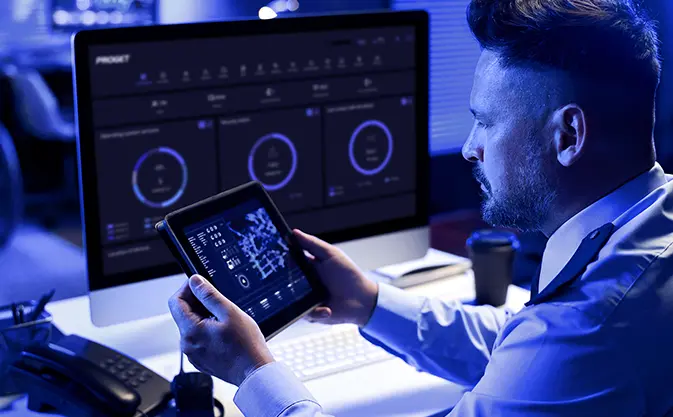
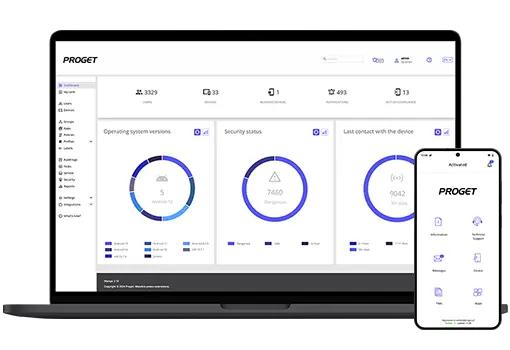
A clear and easy-to-use interface is essential to effective mobile device management. MDM, designed for IT administrators’ daily work, offers a logical panel layout and convenient access to the most critical functions, such as monitoring the fleet’s current status and device registration.
The system’s high ergonomics and mobile efficiency translate into reduced training time for new IT staff and improved end-user experience, which is especially important in dynamic work environments.
Testing the MDM solution before purchasing
The opportunity to test an MDM solution free of charge before making a purchase decision is a key part of the process of selecting the right system. It provides an opportunity to realistically assess its functionality, ease of implementation and suitability for the organisation’s specific needs.
A free trial period allows to:
- experience the platform in practice,
- involve key users in the evaluation process,
- reduce investment risk,
- make a more informed purchasing decision.
Test the Proget MDM system.
Access to vendor technical support
Successful implementation and day-to-day operation of an MDM platform depend heavily on the quality of technical support. When evaluating a solution, organisations should verify whether the vendor offers comprehensive support not only during everyday use, but also throughout testing, implementation, configuration and any future migration projects. Equally important is ensuring that the scope of support is clearly defined – ideally included within the licence – and covers all platform features and related products. Why does this matter?
Imagine that one month after deploying your MDM platform, one of its core features suddenly stops working. You contact technical support only to discover that assistance is available exclusively in a foreign language and during a different time zone. Alternatively, you find yourself communicating with an AI chatbot that repeatedly directs you to generic documentation or refers you to a third-party provider responsible for that particular service.
When selecting an MDM solution, organisations should carefully assess the availability and quality of direct technical support. Even the most feature-rich platform loses much of its value if users are left to resolve critical issues on their own.
Price versus functionality
Many MDM vendors offer tiered licensing models, with essential functionality included in lower-priced packages while advanced capabilities are available only as paid add-ons. When comparing solutions, organisations should look beyond the entry-level price and evaluate what is included in the highest licensing tier, together with its total cost of ownership. This approach provides a far more accurate picture of the overall value offered by each platform and helps organisations identify the solution that best supports both their current operational requirements and their long-term mobile device management strategy.

The future of Mobile Device Management
As organisations continue to embrace digital transformation and the number of connected mobile devices grows, Mobile Device Management platforms continue to evolve. Professional enterprise MDM solutions are no longer limited to device administration. They are becoming an integral part of broader cybersecurity, digital workplace and IT modernisation strategies. The key trends shaping the future of MDM include stronger security capabilities, increased automation and a more holistic approach to endpoint management.
Unified Endpoint Management (UEM)
Unified Endpoint Management extends traditional mobile device management by providing a single platform for administering smartphones, tablets, laptops, desktop computers, printers and wearable devices. This enables organisations to manage their entire endpoint ecosystem through one central management console, regardless of operating system or physical location. By consolidating endpoint management, organisations can apply consistent security policies, standardise software deployment and simplify network configuration.
Automation of processes and updates
Automation within MDM systems has evolved well beyond remote application installation. Today’s solutions support intelligent mobile device management through capabilities such as:
- automatic detection of security policy violations,
- scheduled operating system and application updates outside business hours,
- automated user profile assignment,
- alerts for potential failures and security incidents.
Automated software and application updates through MDM improve mobile efficiency, minimise downtime and ensure that every managed device runs the latest approved software version without requiring manual intervention from IT administrators.
Enterprise mobility and mobile efficiency
As hybrid and mobile working become standard business practice, MDM system is increasingly forming the foundation of the enterprise mobility. It enables employees to work securely from virtually anywhere, whether using a corporate laptop, a personally owned smartphone or a tablet connected remotely to the organisation’s network.
The future of Mobile Device Management (MDM) therefore extends beyond managing devices alone. Increasingly, it encompasses the entire endpoint lifecycle – from initial provisioning and ongoing management to secure decommissioning – while delivering a seamless user experience and maintaining full alignment with corporate IT systems and information security policies.

Summary
A Mobile Device Management (MDM) system is a comprehensive solution for managing smartphones, tablets, laptops and rugged devices within an organisation. Its primary purpose is to enable centralised administration, monitoring and protection of mobile endpoints, regardless of their location or operating system.
With capabilities such as remote data wipe, device locking, encryption, password enforcement and Identity and Access Management (IAM), MDM significantly strengthens the security of both corporate data and business applications. It also streamlines IT operations through automation, reporting and compliance management, helping organisations meet regulatory requirements, including the GDPR and the NIS2 Directive.
Remote device locking and location tracking help protect sensitive information in the event of loss, theft or employee offboarding, while automated compliance policies minimise the risk of security incidents caused by accidental user actions.
MDM solutions streamline phone management and improve staff productivity. Through automatic updates, remote configuration and the rapid deployment of new devices from a single console, they optimise the time and cost of operating and maintaining equipment throughout its entire lifecycle.
Modern MDM platforms are designed to simplify the daily work of IT administrators. An intuitive client interface and well-structured administrative console make managing large fleets of devices faster, more efficient and easier to scale, while providing organisations with complete visibility and control over their mobile environment.
The future of MDM lies in Unified Endpoint Management – a single platform capable of managing every endpoint running an operating system from one central console. This approach combines enterprise mobility, endpoint monitoring, cyber threat protection and granular access management into a unified security strategy. For organisations seeking to build a secure, modern and highly efficient digital workplace, Mobile Device Management has become an essential component of enterprise IT.
FAQ about MDM system
What is mobile device management (MDM)?
Mobile Device Management (MDM) is a type of security software that enables organisations to monitor, secure and manage employees’ mobile devices while enforcing corporate security policies, including password requirements, access controls and application management.
What is an MDM tool?
MDM is a tool that enables employees to use productivity-enhancing applications and resources on mobile devices – while securing company data. With MDM’s advanced platform, IT departments can manage all company devices in one place, regardless of operating system.
Can MDM view my photos?
No. An MDM platform does not provide organisations with access to employees’ personal information, such as private emails, text messages, photos, personal files, browsing history, contacts or financial data. Modern MDM solutions are designed to protect both the organisation’s security and the user’s privacy.
Can MDM see the user’s screen?
No – in standard operating mode, the MDM cannot view the device’s screen. In the event of a hardware fault, the IT department may ask the user for permission to remotely take control of the screen in order to rectify the issue. The user manually accepts the connection request on the device – they can then see the administrator’s actions on the screen. Once the task is complete, the connection is terminated and the administrator loses access to the screen.
Is it possible to remove mobile device management?
It depends on whether the device is owned by the employee or by the company. If the device belongs to the employee (BYOD), they can remove the mobile device management at any time – all they need to do is delete the MDM profile that controls the work space. In the case of company-owned devices, the only secure and legal way to remove MDM is to contact the IT department. Attempting to do so yourself may result in the device being completely locked.
What’s the difference between MDM and VPN?
MDM enables the enforcement of policies and restrictions on the device, whilst a VPN provides secure access to the network. Both tools can help ensure compliance with regulations requiring secure data transmission and access control. It is worth noting that a high-quality MDM solution may have built-in VPN functionality.
What’s the difference between MDM and MAM?
MDM manages and secures the entire mobile device, whilst MAM (Mobile Application Management) allows you to control and protect only the applications installed on the device.
Book your
Proget system demonstration today!

Originally published: 11 June 2025
Updated: 13 July 2026

Author: Magdalena Martens
Marketing manager with many years of experience, specializing in B2B communications in IT. Involved in the cyber security and Mobile Device Management (MDM) solutions topics for several years. Privately a fan of automotive and Kaizen philosophy.